Live incoming orders
Receive confirmed orders from connected restaurant channels without waiting for handwritten notes or duplicate entry.
 Retopos
Kitchen display system
The Retopos KDS brings waiter, cashier, QR, restaurant, and room-service orders into a clear preparation workflow with item details, timing, and status visibility.
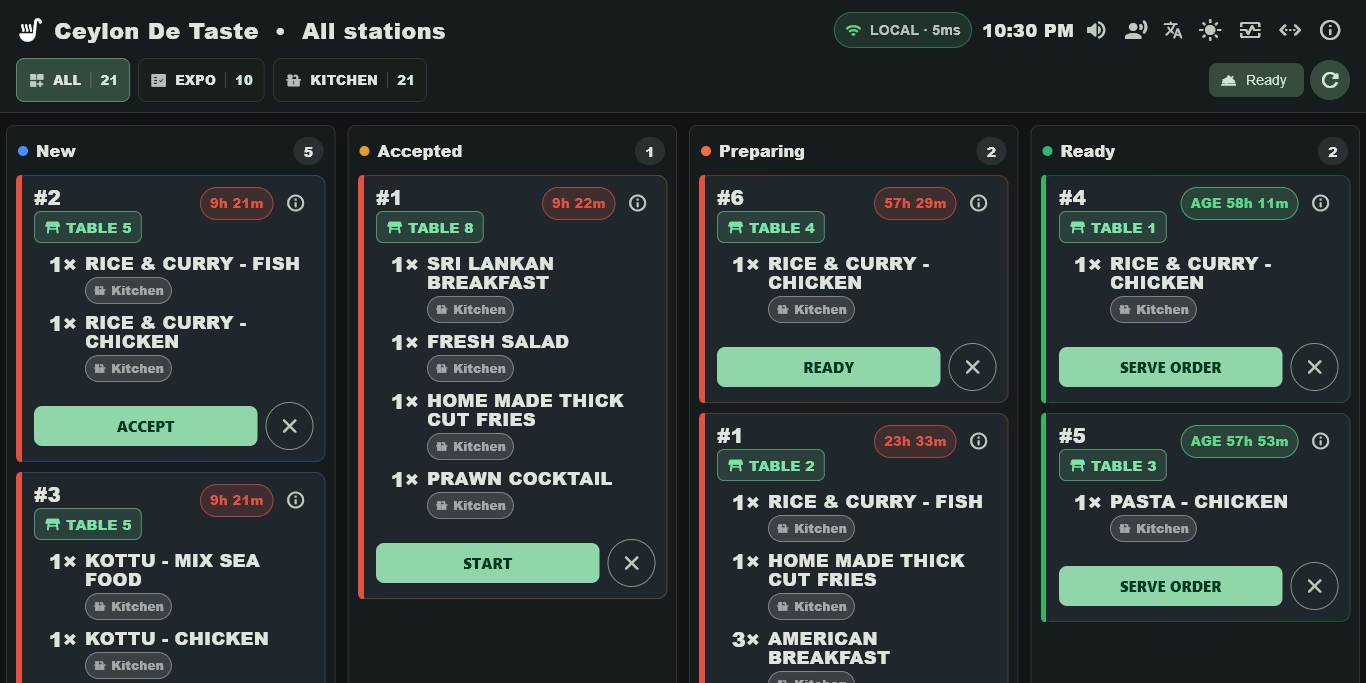
Real product screens
The live KDS groups tickets by status, surfaces elapsed time, and keeps table and station context visible during service.

A clearer kitchen queue
Help kitchen teams understand what to prepare, where the order came from, how long it has been waiting, and when service teams need an update.
Receive confirmed orders from connected restaurant channels without waiting for handwritten notes or duplicate entry.
Keep table, room, order source, item, quantity, and modifier information together for accurate preparation.
Track elapsed time for active orders and make delayed work easier to identify during busy service periods.
Move tickets through preparation states so waiter, cashier, and management screens can follow progress.
Coordinate waiter, counter, QR table, restaurant, and hotel room-service orders in the same operational flow.
Give managers a live view of late orders and preparation activity without interrupting kitchen staff for updates.
Offline-first operations
Retopos is designed around the venue’s local service workflow. Kitchen, waiter, cashier, and manager screens can continue coordinating core operations while hosted services reconnect when internet access returns.
How the KDS works
A confirmed waiter, cashier, QR, restaurant, or room-service order enters the kitchen workflow.
Kitchen staff review items, modifiers, source details, and elapsed time from the display.
The ticket progresses through the preparation flow, keeping connected service screens informed.
Front-of-house or room-service staff can act on the updated status and deliver the order promptly.
Built for different kitchens
Keep table, takeaway, and counter tickets visible with the details required for accurate preparation.
Manage fast-moving drink and food queues while showing staff which orders have waited the longest.
Retain room or restaurant context while coordinating preparation and delivery across hospitality teams.
Kitchen display questions
The connected workflow can receive orders created through waiter, cashier, QR table, restaurant, and hotel room-service channels.
Yes. Relevant item choices and preparation details remain attached to the order for the kitchen team.
The display can show elapsed order time and help teams identify work that is becoming late.
Status updates remain part of the connected Retopos workflow so service and management screens can follow progress.
Connect digital tickets, preparation timing, status updates, and service teams with Retopos.